

A screen protector looks simple, a thin sheet of glass or film pressed against the skin of your phone, yet it’s the only layer standing between friction and fracture. Over time that layer clouds, cracks, or starts peeling at the corners, turning protection into interference. Removing it is not about peeling plastic; it’s about separating two adhesive surfaces without disturbing the chemistry beneath.
Modern displays are layered: an oleophobic coating, the touch digitizer, and the glass itself, all sealed under pressure. That means any uneven lift or sudden twist can tug at the edges of the digitizer or strip the coating. For flat panels, the process is forgiving. For curved or foldable screens, it isn’t.
This guide focuses on every other case, such as aftermarket glass, hybrid film, or hydrogel protectors, where precision and patience decide whether the screen underneath stays flawless.
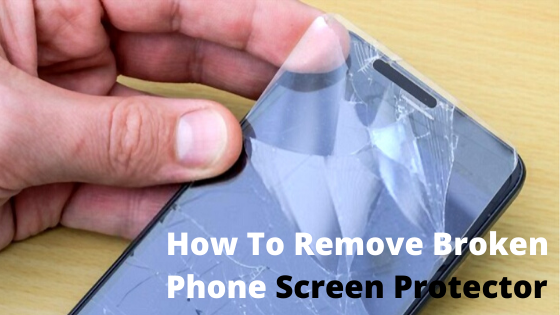
How to Prepare Your Phone Before Removing a Screen Protector
Treat the surface like a workspace, not a gadget. Remove your case, power the phone off, and make sure it’s dry. A clean, indirect light source helps you see adhesive edges and hairline cracks. Dust is your enemy — a single grain under the lifted film can drag a micro-scratch across the panel.
Set out what you’ll actually use:
- A microfiber cloth to keep oils off the display.
- A plastic card or guitar pick for prying.
- A small loop of painter’s tape or masking tape for grip.
- 70% isopropyl alcohol for residue, applied to cloth, never directly.
- A hairdryer on low heat, held roughly 15–20 cm away.
Heat matters because most protectors rely on silicone-based adhesive. A brief, moving wave of warm air softens it just enough to loosen without warping the screen. Keep the heat moving; never hold it still.
Before you start, know what you’re dealing with. Tempered glass feels rigid and cool; PET or TPU film flexes; hydrogel stretches slightly like rubber. That texture tells you how much heat or tension to apply later. Think of it as reading the material before cutting — it prevents guesswork once you begin.
The Safe Screen Protector Removal Process
This is where the work actually happens. Everything before was preparation; now it’s about touch, timing, and precision. Each step matters because one careless move can turn protection into damage.
These steps apply to both iPhone and Android displays, including Samsung, Google Pixel, Xiaomi, and OnePlus models.
Step 1 – Create a lift point
Warm the screen for 10–15 seconds in slow, side-to-side passes, just enough to soften the adhesive. Then, use a tape loop or your fingernail at one corner to raise the edge until the card can slide under. The goal is to separate the adhesive from the glass for a controlled entry point with zero coating damage.
Step 2 – Peel at a shallow angle
Once an edge lifts, slide the card slowly while pulling the protector back at roughly 45 degrees. Keep it close to the surface and avoid lifting upward. This angle spreads the tension evenly across the sheet for a smooth release without a snap or crack.
Step 3 – Handle residue
Adhesive dots or foggy patches may remain. Press a fresh piece of tape against them, or wipe gently with a microfiber cloth slightly dampened in alcohol. Keep liquids away from ports and seams. You’re cleaning polymer, not soaking electronics.
Step 4 – Final check
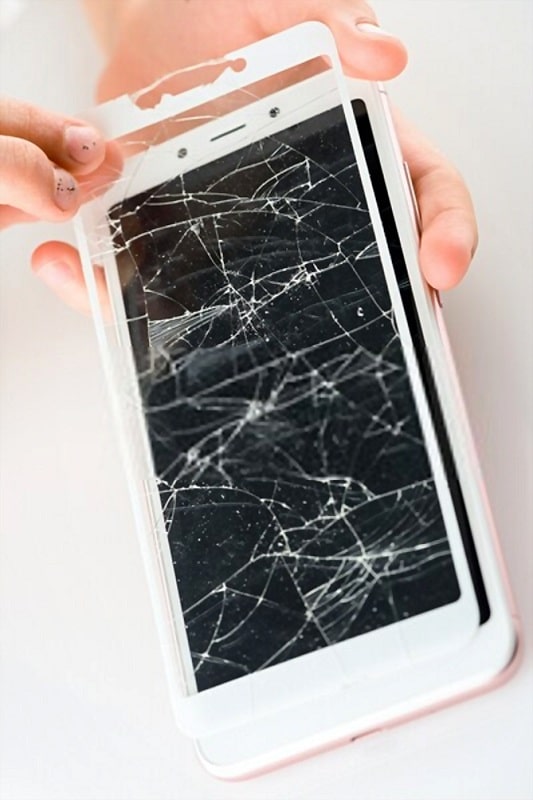
Inspect the display under angled light. If shards from a shattered protector cling to the surface, lift them with tape while wearing gloves for safety. The screen should now be clear and ready for its next layer.
Hydrogel protectors behave differently — instead of snapping, they stretch. Roll them off slowly with fingertip pressure, letting the film curl away from the screen. Patience does more work than heat ever will.
Common Mistakes and Micro-Damage Scenarios
Most failed removals come from force or shortcuts. Metal tools slice coatings instantly; even a paperclip leaves a hairline groove visible only under reflection, but permanent once there. Overheating a fixed spot can tint AMOLED sub-pixels or dull the oleophobic layer. Always keep the dryer moving or stop altogether after 15 seconds.
Pulling straight up is another silent killer — it snaps tempered glass protectors into shards that can scrape across the real display. A shallow peel avoids that. Flooding alcohol across the surface can wick into speaker slits or the proximity sensor window; the safe method is always a slightly damp cloth, never a soak.
These errors don’t look dramatic at first glance; the screen lights, the touch works, but a week later you notice ghost smudges or rainbow streaks where coating lifted. Every mistake here is about invisible damage— the kind only visible under the right light when it’s too late to undo.
What Should You Do After Removing the Screen Protector
Once the protector is gone, treat the display as raw glass. Wipe gently with a microfiber cloth and a single drop of 70% IPA to remove fingerprints and residual oils. Dry with the opposite side of the cloth until friction disappears — that smooth glide confirms the coating is still intact.
Dust settles fast, so protect the phone right away. Either install the new protector immediately or keep the device in a microfiber pouch or a protective case with raised edges. Leaving it bare for even a few minutes invites lint that ruins a fresh installation.
When choosing a replacement:
- Tempered glass: best for hardness and scratch defense. Pick 2.5D curved edges with a real oleophobic coating and a “case-friendly” width so corners don’t lift once you re-fit the case.
- Hydrogel or TPU film: great for edge-to-edge flexibility or stylus precision; easier to install but less rigid.
- Foldables: only Samsung’s service centers should replace the inner film — their heat-bonded adhesive aligns with the hinge’s stress zones.
Before applying any protector, ensure the display is dust-free. Use dust-removal stickers or a small strip of tape to pick up stray particles — the same technique used during factory assembly. If you’re skipping protectors altogether, a light oleophobic refresh kit restores glide without adding thickness.
Final Take
Removing a screen protector the right way isn’t routine maintenance — it’s craft. Every movement counts, from the first flick of heat to the last microfiber pass. Do it right, and the glass beneath feels new again: smooth, weightless, unfiltered. The difference between careless and careful is only a few seconds, but it’s those seconds that decide whether you’re protecting your phone or undoing it.
See also
vurtilopmer
I¦ll right away grab your rss feed as I can’t to find your email subscription hyperlink or e-newsletter service. Do you’ve any? Please allow me know so that I may subscribe. Thanks.